2 Jul 2025
React design patterns and Anti-Patterns
Design Patterns in React are reusable solutions to common problems in application development. These patterns improves code quality, scalability and maintainability.1 - Presentational vs Container Components
Separate UI from business logic
Presentational components handle only the UI, while container components manage the logic and data.
// Presentational (Dumb) Componentconst UserCard = ({ name, email, avatar }) => (
<div className="card">
<img src={avatar} alt={name} />
<h3>{name}</h3>
<p>{email}</p>
</div>
);
// Container (Smart) Component
const UserContainer = () => {
const [user, setUser] = useState(null);
useEffect(() => {
fetchUser().then(data => setUser(data));
}, []);
return user ? <UserCard {...user} /> : <LoadingSpinner />;
};Higher-Order Components (HOC)
Cross-cutting concerns like authentication, logging, analytics.
HOCs are functions that take a component and return a new component with additional functionality.
const withLogger = (WrappedComponent) => {
  return (props) => {
    useEffect(() => {
      console.log('Component mounted:', WrappedComponent.name);
      return () => console.log('Component unmounted:', WrappedComponent.name);
    }, []);

    return <WrappedComponent {...props} />;
  };
};
Custom Hooks
Reusable stateful logic.
Custom Hooks allow you to reuse logic by encapsulating it into a function, making the code cleaner and easier to maintain.
const useFetch = (url) => {
  const [data, setData] = useState(null);
  const [loading, setLoading] = useState(true);

  useEffect(() => {
    fetch(url)
      .then(res => res.json())
      .then(data => {
        setData(data);
        setLoading(false);
      });
  }, [url]);

  return { data, loading };
};
2 - State Management Patterns
Context API + Reducer
Global state management without external libraries.
const CartContext = createContext();

const cartReducer = (state, action) => {
  switch (action.type) {
    case 'ADD_ITEM':
      return [...state, action.payload];
    // ... other cases
  }
};

const CartProvider = ({ children }) => {
  const [cart, dispatch] = useReducer(cartReducer, []);
  return (
    <CartContext.Provider value={{ cart, dispatch }}>
      {children}
    </CartContext.Provider>
  );
};
State Machines (XState)
Complex state transitions (e.g., forms, workflows).
import { createMachine } from 'xstate';

const toggleMachine = createMachine({
  id: 'toggle',
  initial: 'inactive',
  states: {
    inactive: { on: { TOGGLE: 'active' } },
    active: { on: { TOGGLE: 'inactive' } }
  }
});
3 - Composition Patterns
Render Props
Sharing component logic while maintaining render flexibility.
<MouseTracker>
  {({ x, y }) => (
    <p>Mouse position: {x}, {y}</p>
  )}
</MouseTracker>
Compound Components
Building component ecosystems (e.g., tables, menus).
const Tabs = ({ children }) => {
  const [activeIndex, setActiveIndex] = useState(0);
  return Children.map(children, (child, index) =>
    cloneElement(child, {
      isActive: index === activeIndex,
      onSelect: () => setActiveIndex(index)
    })
  );
};

const Tab = ({ isActive, onSelect, children }) => (
  <button onClick={onSelect} className={isActive ? 'active' : ''}>
    {children}
  </button>
);
4 - Performance Patterns
Memoization
Optimizing re-renders for heavy computations.
const ExpensiveComponent = React.memo(({ data }) => {
  // Component logic
});

const memoizedValue = useMemo(() => computeExpensiveValue(a, b), [a, b]);
const memoizedCallback = useCallback(() => doSomething(a, b), [a, b]);
Virtualization
Large lists/table rendering.
import { FixedSizeList as List } from 'react-window';

const Row = ({ index, style }) => (
  <div style={style}>Row {index}</div>
);

<List
  height={400}
  width={300}
  itemCount={1000}
  itemSize={35}
>
  {Row}
</List>
Anti-Patterns to Avoid
God Components
- Problem: Monolithic components doing too much.
- Solution: Split into smaller, focused components.
Prop Drilling
- Problem: Passing props through multiple layers.
- Solution: Use Context API or state management.
Direct DOM Manipulation
- Problem: Using document.getElementById in React.
- Solution: Use Refs and React's declarative model.
Index as Key
- Problem: <li key={index}> in dynamic lists.
- Solution: Use unique IDs from data.
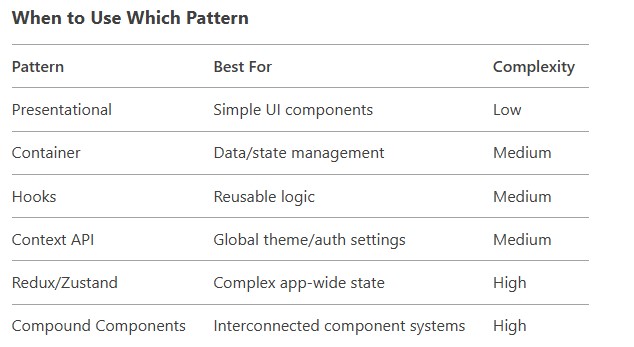
Key Principles
- Single Responsibility: Each component/hook should do one thing well.
- Composition Over Inheritance: Build features by combining components.
- Unidirectional Data Flow: Parent → child props, events via callbacks.
- Declarative Style: Describe UI based on state, not manual DOM updates.